
Pages

Showing posts with label Beauty. Show all posts

Beauty Editorial Depicts Beat-Up Women, Sparks Outrage

An online magazine editorial, portraying female victims of violence, is receiving a huge backlash on the Internet. Online Bulgarian magazine 12‘s latest beauty editorial called Victim of Beauty shows photos of models with a black eye, slit throat, severe burn and torn flesh.

In Bulgarian — a warning for the online photo spread translates: “Recommended Parental Controls: pictures are not recommended for persons under 16 years. And for the faint hearted.” The editorial was shot by photographer Vasil Germanov. Makeup on the six models was by Daniela Avramova.

Angry viewers are taking to the website’s comment section, Twitter and other outlets to voice their dismay with magazine.

One commenter on the website writes, “This is the glorification of violence against women dressed up as ‘art.’ It is demoralizing to women and offensive to anyone who has ever experienced violence. Use the pictures for a campaign against violence against women. Otherwise you must expect to be condemned for trying to cash in on something that is so reprehensible.”

Twitter users have also reached out to the magazine. Many feel the publication is glamorizing violence and sensationalizing abuse against women. Here are some Twitter reactions.

However, the magazine stands by its photo spread showing models in H&M skirts and clothes by Iabel Capasca. Editors in Chief of the magazine Huben Hubenov and Slav Anastasov told Mashable they don’t think the photos promote violence or abusive behavior in any way.

“Quite frankly, we do not think that there is a person, who will see the photographs and automatically assume that violence is okay,” Hubenov and Anastasov wrote in an email.

Though photos show women who are beat up and cut, the magazine editors say they never mention domestic violence or reference to “pain inflicted by men on women.”

“Yes, if someone is hyper-sensitive to trauma, we agree that this shoot may provoke their inner demons, invoke unpleasant memories, and we apologize to anyone who feels offended by it, this was not our intent,” they wrote.

The editors believe the global response to the editorial piece is an “overreaction, adding, “We have to clarify, that even though this shoot is talking about violence in general, and pain as part of beauty, it does not talk exclusively about domestic violence, or pain inflicted by men on women. That being said, the overreaction from the other side of Atlantic surprise us, and frankly – scares us.”

Do you think people are overreacting to this beauty editorial? Share your thoughts with us — does these photos glamorize violence against women?

Warning: This slideshow contains some violent images.

Image courtesy of 12 magazine, Vasil Germanov
Read more >>

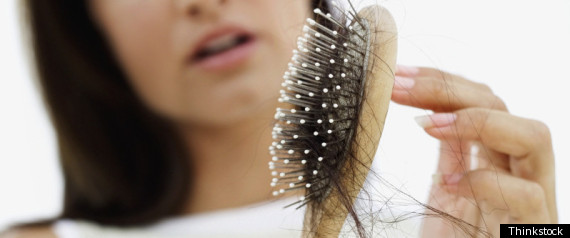
Hair Loss-Divorce Correlation: Study Suggests Splits Cause Hair Loss In Women

Getting divorced is tough. Splitting your finances, your property, your kids, your time -- all of those factors can lead to high levels of stress. And according to a new study, all of that stress can lead to increased hair loss in divorced women.


Dr. Bahman Guyuron, the study's lead author, found that women who have had multiple marriages (including widows and divorcees) suffer more hair loss than those who are happily married. In men, marital status did not appear to impact hair loss patterns; genetics and excessive smoking were the top factors. He analyzed the lifestyles and hair patterns of 66 identical male twins and 84 female twins to determine which external factors contribute to hair loss.

So why does divorce affect women so differently? Dr. Guyuron, a Cleveland-based plastic surgeon, attributes his findings to gender differences: "The stress of going through a divorce may not be as troublesome for a male as it is for a female. They [men] may jump from one relationship to another relationship a lot faster," he told us. "[Women] take relationships more seriously and perhaps they are more uncomfortable for a longer period time because of a divorce. It takes its toll on them a great deal more than on males." He says his explanation does not have scientific proof, but is based on common sense and his experiences with men and women in his practice.

The study, which is being presented at the American Society of Plastic Surgeons' annual conference in Denver on Sunday, also revealed that other external factors can contribute to hair loss in women. In particular, sleeping more than eight hours per day, excessive smoking and sun exposure can increase your risk.

So what can women do to combat hair loss? Dr. Guyuron has a few suggestions: Wear a hat and sunscreen outdoors, drink coffee in moderation, limit the number of hours you sleep each day, avoid smoking -- and "stabilize your marriage."

Read more >>

Super simple way to work with Twitter API (PHP + CSS)

In this post I want to illustrate a super simple way to work with Twitter API and PHP. In particular, this tutorial explains how to get public updates from Twitter public timeline and display them in a web page with a custom style using CSS. In order to get Twitter updates I used Twitterlibphp (a PHP implementation of the Twitter API) that allows you to take advantage of it from within your PHP applications.

Using this simple method you can obtain awesome results like this:


You can download the source code at the following link and reuse it for free in your web projects (you need PHP and APACHE):


1. A little introduction
Twitterlibphp returns Twitter timeline in XML format and with this structure (take a look at the Twitter API home page for a full list of available nodes.):

status
created_at
id
text
source
user
name
screen_name
description
profile_image_url
url
followers_count
...
...
But how you can display them? It's very simple! Take a look at the following code!


2. PHP code
Create a new file twitter_status.php and copy and paste the following code:

<div class="twitter_container">
<?php
// require the twitter library
require "twitter.lib.php";

// your twitter username and password
$username = "your_username";
$password = "your_password";

// initialize the twitter class
$twitter = new Twitter($username, $password);

// fetch public timeline in xml format
$xml = $twitter->getPublicTimeline();

$twitter_status = new SimpleXMLElement($xml);
foreach($twitter_status->status as $status){
foreach($status->user as $user){
echo '<img src="'.$user->profile_image_url.'" class="twitter_image">';
echo '<a href="http://www.twitter.com/'.$user->name.'">'.$user->name.'</a>: ';
}
echo $status->text;
echo '<br/>';
echo '<div class="twitter_posted_at">Posted at:'.$status->created_at.'</div>';
echo '</div>';
}
?>
<div>


How you can see, the previous code is very simple to understand. The line:

$xml = $twitter->getPublicTimeline();

get the 20 most recent public statuses posted. You can also use other functions such as:

getFriendsTimeline(): returns the 20 most recent statuses posted by the authenticating user and that user's friends.

- getUserTimeline(): returns the 20 most recent statuses posted from the authenticating user.

getReplies(): returns the 20 most recent @replies (status updates prefixed with @username) for the authenticating user.

Take a look at twitter.lib.php for the full list of available functions.

If you want to display different information, for example the source of the update (status->source) use this code:

$status->source

...or if you want to display the number of followers of the current user (follower_count) use this code:

$user->followers_count


3. CSS Code
Now you can customize the style of your timeline using CSS code. I used the following classes but you can customize the look how you prefer:

.twitter_container{

color:#444;
font-size:12px;
width:600px;
margin: 0 auto;

}
.twitter_container a{

color:#0066CC;
font-weight:bold;

}
.twitter_status{

height:60px;
padding:6px;
border-bottom:solid 1px #DEDEDE;

}
.twitter_image{

float:left;
margin-right:14px;
border:solid 2px #DEDEDE;
width:50px;
height:50px;

}
.twitter_posted_at{

font-size:11px;
padding-top:4px;
color:#999;

}


That's all! Download the source code, open twitter_status.php, change $username and $password with your Twitter username and password and upload the file in your test server.
If you have some suggestion, please add a comment!

Read more >>
Next Post